

Problem
How often do you encounter that accounts in the Password Manager of the SDDC Manger are going to expire or already expired/disconnected.

In this blog I will explain a easy solution to automate this and keep accounts from expiring.
Solution
The solution on this process is easier then you think, use the password rotation of the SDDC Manager and disable the password expiry on the OS (NSX Managers, NSX Edge Nodes and vCenter)
Don’t use the password rotation for your administrator@vsphere.local on your management domain!
Workload domains can be used in the password rotation.
vCenter root account(s) (don’t use it for the administrator@vsphere.local)
To disable te password expiration of vCenter you can follow the next steps:
- SSH into the vCenter appliance.
- Use the following command as root:
chage -I -1 -m 0 -M 99999 -E -1 root
Source: Reset the root password in vCenter Server Appliance without reboot / 6.7u1 / 7.x / 8.x
NSX Manager and NSX Edge Node
- Connect to the NSX Manger Node or NSX Edge Node with the admin account.
- Reset the expiration period with the following command for each user:
clear user admin password-expiration
clear user root password-expiration
clear user audit password-expiration - Set expiration period to 9999 for each user:
set user admin password-expiration 9999
set user audit password-expiration 9999
set user root password-expiration 9999
Source: Credential operations fail on NSX Components in SDDC Manager
Aria Suite Lifecycle
- Connect to the LCM appliance as root.
- Use the command:
chage -I -1 -m 0 -M 99999 -E -1 root - Do this also for other users like vcfadmin@local.
Source: Resetting the root password in VMware Aria Suite Lifecycle (vRealize Suite Lifecycle Manager)
Set Password Rotation in the SDDC Manger
- Go to the UI of your SDDC Manger.
- Go to Security > Password Management.
- From here select the accounts you want to Schedule a Rotation for (ESXi is not supported for Schedule Rotation).

- Chose how many days a rotation needs to be executed.
Summary
After these changes you disabled the password expiry on the OS layer and let the SDDC Manager take care of the Password Rotation.
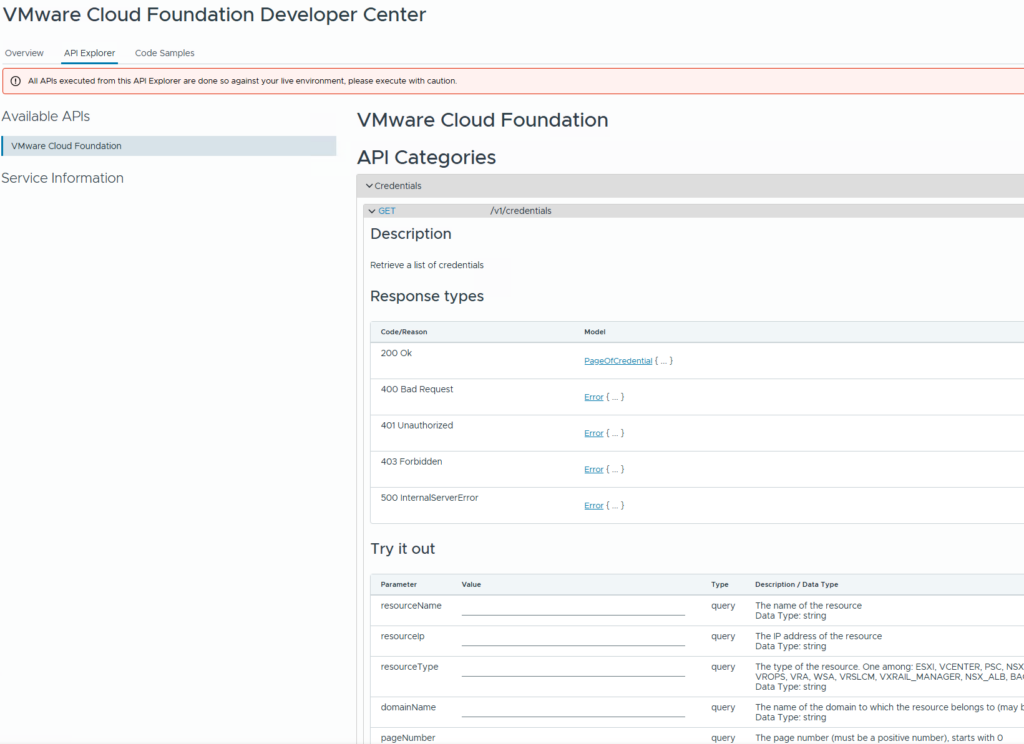
If you need to find a password as SDDC Manager will rotate them for you can look them up in the Development Center > API Explorer > Credentials: